Your DAW, live in Discord voice.
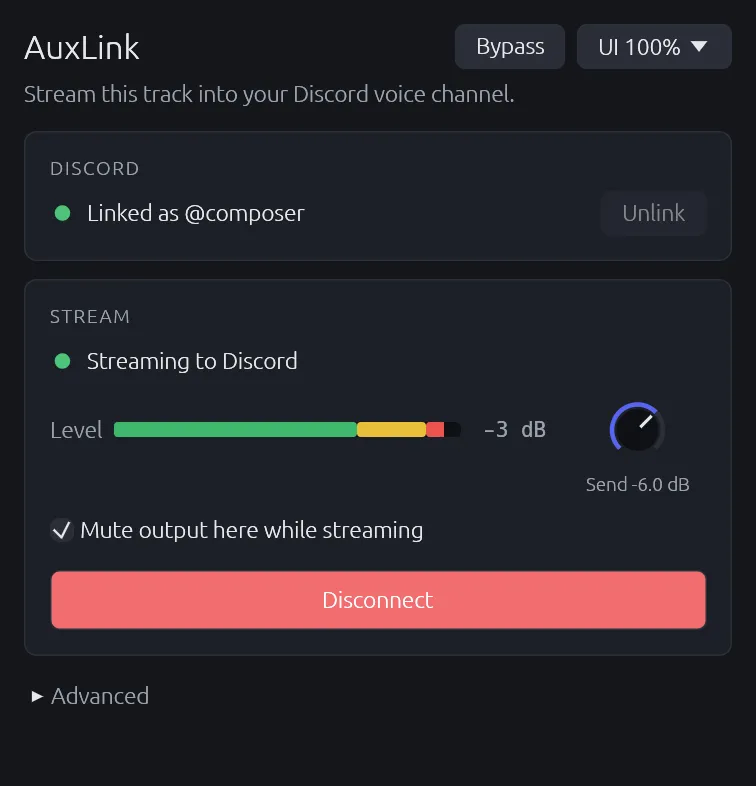
Put AuxLink on a track or bus, press Connect, and everyone in your voice channel hears your session in Discord.
Windows 10 & 11 · VST3 & CLAP · Free during the beta. Install notes
Three steps, one time.
-
1 Add the bot
Add AuxLink to your Discord server. It needs to see, join and speak in the voice channels you'll use.
-
2 Link once
Install the plugin, press Link Discord, and give the code to /link in Discord. Once per computer.
How linking works -
3 Join and connect
Join a voice channel and press Connect. AuxLink joins with you and plays whatever reaches the plugin.
- A AuxLink App
- y you
- k kai
- m mo
Made for listening sessions.
Play a mix for a client, share sketches with your team, or run a listening party. Whoever is in the channel hears it.
- Listeners need only Discord
- No links to open, no browser tab to keep alive.
- Two streamers, mixed
- Up to two people can stream into one channel at once; AuxLink mixes them.
- Its own send level
- The send knob sets how loud you are in Discord, separate from what you hear.
- Ends by itself
- When the channel empties, or a couple of minutes after the last person stops.
- Never recorded
- Audio is relayed live into the channel. Never recorded or stored.
Good to know
- Delay
- Around half a second to a second behind your DAW: made for listening along, not playing in time.
- Monitoring
- Keep listening to your DAW directly, and mute the AuxLink bot on your side in Discord. How
- Runs on
- Windows 10 and 11, 64-bit, as VST3 or CLAP. Tested in Ableton Live and Cubase. macOS: not yet.
- Price
- Free during the beta.
AuxLink is in beta.
Something off? In the plugin, open Advanced, add a note and press Send logs. It comes straight to us.